Your firewall keeps hackers out, but what stops your data walking out the door?

LinkedIn Article by Logiq
Your firewall keeps hackers out, but what stops your data walking out the door?
Most businesses we work with have sensible tooling in place to protect themselves from the outside. You’ve likely got the email filtering, web protection, anti-virus, vulnerability management, and encryption all sorted.
But the uncomfortable question we often have to ask is: What are you doing to stop data being leaked from the inside?
Do you have anything in place to stop sensitive client structures, tax advice, or privileged correspondence from being exfiltrated to the outside world? You might have policies, but what if they are bypassed (accidentally or intentionally) and that information gets out?
We’ve been implementing Microsoft Purview in several client environments (particularly in the Legal and Trust sectors), and the peace of mind it gives Partners and Directors is genuine. It’s less about blocking people and more about putting a safety net around your reputation.
The Protections
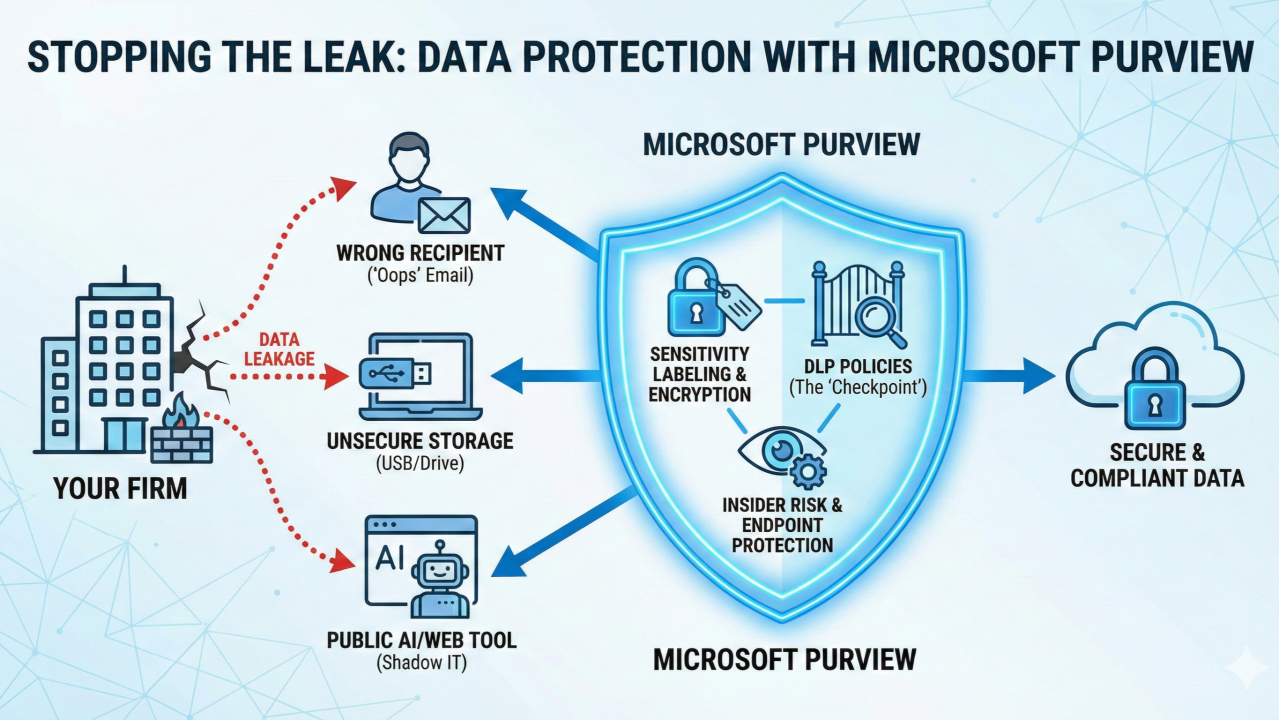
Rather than just locking the doors to the building (your firewall), Purview locks the files themselves.
- It travels with the data: You can apply sensitivity labels (like "Client Confidential" or "Internal Only"). Once a file is labelled, it’s encrypted. If that file is stolen, emailed to a personal Gmail account, or put on a cloud drive, it’s useless to anyone else. They simply can’t open it.
- The "oops" catcher: We configure Data Loss Prevention (DLP) policies that act as a second pair of eyes. It spots if someone is trying to send a credit card number, a tax reference, or a document marked "Strictly Private" to someone outside the firm and blocks it before it leaves the outbox.
Real-World Scenarios
The Leaver Risk
An employee hands in their notice to join a competitor. In their final week, they decide to download a database of contacts, proprietary precedents, or client lists to a spreadsheet for emailing, or a personal Dropbox.
- The Fix: Purview spots this unusual behaviour (like a sudden spike in file downloads or an attempt to move data to unapproved storage) and blocks the transfer immediately.
The Autocomplete Mistake
A Trust Officer is rushing to send a sensitive update to a client named "Sarah". Outlook’s autocomplete suggests a different Sarah (perhaps a journalist or a vendor) and they hit send without double checking.
- The Fix: The system recognises that sensitive financial data is being sent to an external recipient who isn't authorised to receive it. It stops the email and nudges the sender to check who they are sending it to.
Shadow IT and the "AI Problem”
A well-meaning paralegal tries to save time by pasting a complex clause or client data into a public tool like ChatGPT to summarise it.
- The Fix: Endpoint protection can prevent "Confidential" data from being pasted into unapproved web browsers or applications, ensuring client data stays within your controlled environment.
Why it matters
In our industry, a data breach is rarely just an IT headache; it’s a conduct issue. Tools like this shift the focus from simply securing the perimeter to securing the data itself, ensuring that even when human error happens, client trust remains intact.
#dataleak #logiqCanHep #purview #jersey